Ergonomics
Is sitting really the new smoking? What the research says, and how to fix your desk and your day
The slogan is overdone, but long unbroken hours in a chair do cost you. What the big studies actually found, how to set up your desk properly, and a daily plan that works in Nigeria.
Count the hours you sat yesterday. Not just at the desk. The bus or the car through Third Mainland Bridge traffic, the eight or nine hours of work, lunch eaten in front of the laptop because a client was waiting, the drive home, then Netflix on the sofa. For a lot of people in Lagos that is eleven or twelve hours, and none of it was a decision.
You have probably seen the line "sitting is the new smoking" attached to that fact. It is a great slogan and a poor summary of the science. The real picture is less frightening and more useful, because it tells you what to change. First the research, then the practical part: your chair, screen, keyboard and desk, and how to fit movement into a day of NEPA, traffic and calls.
Where "sitting is the new smoking" came from, and why it overstates things
The phrase is usually credited to Dr James Levine, an obesity researcher at the Mayo Clinic who invented the treadmill desk and pushed the idea hard in a 2014 book. In interviews he went as far as saying sitting was more dangerous than smoking, and the line spread because it was short and scary.
A 2018 review in the American Journal of Public Health, led by Jeff Vallance, put the numbers side by side. Current smokers have roughly 2.8 times the risk of dying from any cause compared with people who never smoked, and heavy smokers have more than four times the risk. For people who sit the most, the best estimate at the time was a risk about 22% higher than people who sit the least. In absolute terms, the authors estimated more than 2,000 extra deaths per 100,000 people a year among the heaviest smokers, against about 190 extra deaths per 100,000 for the heaviest sitters.
So the comparison does not hold: smoking is in a league of its own. But the authors were careful not to call sitting harmless. A risk around 20% higher, spread across hundreds of millions of desk workers, is still a real problem. They just wanted people to see its actual size.
A fairer slogan would be "sitting a lot and moving very little is bad for you." Less catchy, but every word of it is backed by evidence, and the second half is the part you control.
What long hours of sitting actually do to your body
When you sit still, the big muscles of your legs and hips go almost silent. They are among the body's biggest users of blood sugar and fat, so when they idle for hours you clear sugar and fat from your blood more slowly after a meal. One long afternoon does not matter much. Years of them are linked with higher rates of type 2 diabetes, heart disease and some cancers. Blood flow in the legs slows too, which is part of why your ankles feel heavy by evening.
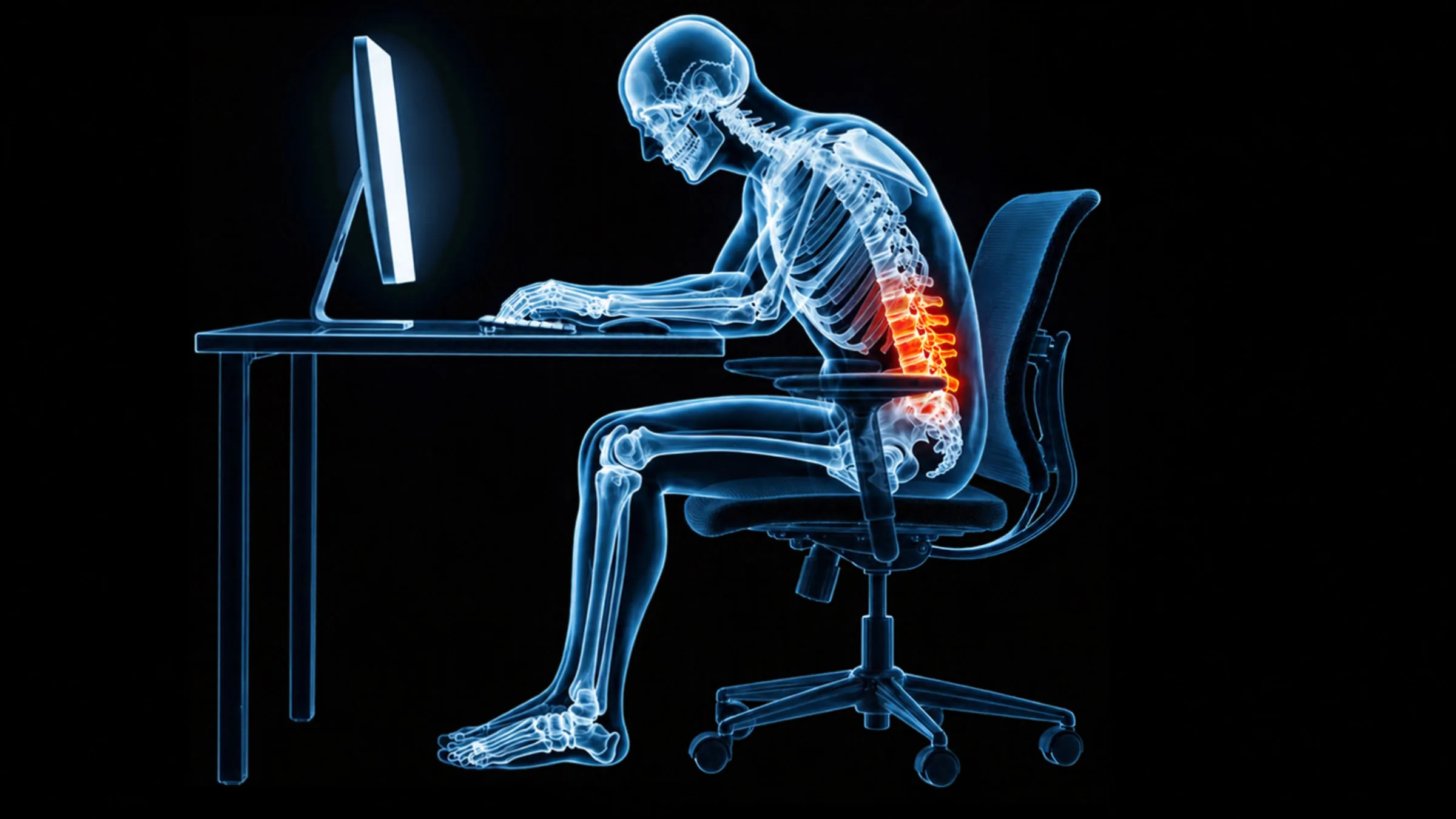
The mechanical side you feel sooner. Slumping rounds your lower back into a position it was not built to hold for hours. Your hip flexors (the muscles at the front of the hip) stay shortened, and the muscles across your upper back that should hold you upright do less and less, so slouching gets easier and sitting tall gets more tiring.
Your neck may have it worst. A widely quoted 2014 computer model by spine surgeon Kenneth Hansraj estimated the head puts about 5 kg on the neck when upright, rising to about 12 kg at a 15-degree forward tilt and about 27 kg at 60 degrees. It was a model, not measurements in people, so treat the numbers loosely. The principle holds: the further your head drops towards a low laptop screen, the harder your neck muscles work, for hours.
Can an hour of exercise cancel out a day at the desk?
You will often hear that "an hour at the gym can't undo eight hours of sitting." The best evidence we have says that is mostly wrong, which is good news.
In 2016, a team led by Ulf Ekelund published an analysis in The Lancet that pooled 16 studies covering just over a million adults, followed for between two and eighteen years. Among the most active, people who did about 60 to 75 minutes of moderate activity a day (brisk walking, cycling, that kind of effort), sitting for more than eight hours a day was not linked to a higher risk of early death.
Caveats: it was observational, so it shows a pattern, not proof of cause; most participants were over 45 and lived in Western Europe, the US or Australia; and about three in four never reached that hour a day.
One detail matters a lot for evenings: TV time was harder to offset. Watching three or more hours of TV a day was linked to higher death risk in every group except the most active, and even they showed higher risk once TV time reached five hours a day. TV sitting tends to be long, unbroken and after dinner, which may be part of the reason.
The World Health Organization's 2020 guidelines landed in the same place. They recommend 150 to 300 minutes of moderate activity a week for adults (or 75 to 150 minutes of vigorous activity) plus muscle strengthening on two or more days, and for the first time told adults to limit sedentary time and replace some of it with activity of any intensity, even light. They also dropped the old rule that only bouts of ten minutes or more count.
Breaking it up: what five minutes every half hour did
Few people find a full hour every day, so do small, frequent breaks help? A 2023 Columbia University study led by Keith Diaz tested this. Eleven adults spent a simulated eight-hour workday in the lab, trying a different break pattern on each visit.
The winner was five minutes of easy walking every 30 minutes. Compared with sitting straight through, it cut blood sugar spikes after large meals by 58%, and lowered blood pressure by about 4 to 5 mmHg. That was the only pattern that improved both blood sugar and blood pressure. Most of the walking patterns also left people feeling less tired and in a better mood. Frequency mattered: walking only once an hour, whether for one minute or five, did nothing measurable for blood sugar.
It was small and short: eleven people, one day per pattern, so it shows the immediate effect, not years. But it fits a larger picture. A 2022 study in Nature Medicine led by Emmanuel Stamatakis at the University of Sydney put activity trackers on more than 25,000 UK adults who did no exercise. Those who managed about three bursts of vigorous everyday activity a day, one to two minutes each (rushing up stairs, walking very fast), had a 38 to 40% lower risk of dying during follow-up than those who did none. Again an association, not proof. These bursts are now often called "exercise snacks".
Why standing all day is not the fix either
Standing looks like the obvious cure. It is not. In 2024 a University of Sydney team led by Matthew Ahmadi published a study in the International Journal of Epidemiology using wrist tracker data from more than 83,000 UK Biobank adults, followed for about seven years.
Standing more did not lower the risk of heart disease or stroke. And once standing went past about two hours a day, each extra 30 minutes was linked to roughly 11% higher risk of circulation problems such as varicose veins and chronic venous insufficiency (blood pooling in the legs). Sitting for more than ten hours a day, meanwhile, was linked to higher risk of both heart and circulation problems.
The takeaway: stop thinking sitting versus standing, and think about moving. Standing still is just a different static position. That is why we see a sit-stand desk as a tool for changing position often, not for standing eight hours.
Fix 1: set your chair height properly, in this order
Most people set up in the wrong order: they sit however the chair happens to be, then hunch to reach the desk. Start with the chair, because it sets your body's position, then fit everything else around you.
- Sit all the way back so your lower back touches the backrest. If the chair has lumbar support, it should sit in the curve just above your belt line.
- Adjust the height until your feet are flat on the floor and your thighs are roughly level, with your knees at about a right angle or slightly more open. Hips level with or a little above your knees is fine.
- Check the seat depth. You should be able to slide two or three fingers between the front edge of the seat and the back of your knee. If it presses into your knees, a lumbar cushion behind you moves you forward.
- Recline the backrest slightly. An angle between your torso and thighs of roughly 90 to 110 degrees is easier on your lower back than bolt upright.
- Lower the armrests until your shoulders are relaxed, or move them out of the way. Armrests that push your shoulders up are worse than no armrests.
Common mistakes: perching on the front edge, tucking your feet under the chair, and long stretches cross-legged. If your feet cannot reach the floor once the chair suits the desk, use a footrest or a sturdy box; dangling feet press on your thighs and pull your back into a slump.
A chair with no height adjustment will fight you on every other fix here, so that is the one feature we would not compromise on. Our ergonomic chairs start from ₦160,000 at the time of writing (November 2026), and our guide to the best office chairs in Nigeria explains what else to look for.
Fix 2: bring the screen up to your eyes
With the chair set, sit back and look straight ahead. The top line of the screen should be at or slightly below that eye line. US occupational safety guidance (OSHA) suggests the centre of the screen sit around 15 to 20 degrees below your eye level, at a distance of roughly 50 to 100 cm. Quick test: sit back and stretch your arm out; your fingertips should land around the screen.
Bigger screens go further back: a 27-inch or 34-inch ultrawide is happier at the far end of that range. If you wear varifocals, set the screen lower and tilt it back, or you will tip your head back to read through the bottom of your lenses. Put the screen straight in front of you. With two monitors used equally, centre the pair on your nose; if one is your main screen, put that one straight ahead. Place screens side-on to windows where you can, because squinting against glare pushes your head forward too.
Laptops are the big problem. On a desk, the screen sits far too low, and no posture trick fixes it, because the screen and keyboard are joined: get one at the right height and the other is wrong. The fix is to separate them. Raise the laptop on a stand or riser to eye height and use a separate keyboard and mouse, or plug into an external monitor. If you still look down at a laptop all day, a cheap keyboard and mouse will do more for your neck than an expensive chair.
Fix 3: keep the keyboard and mouse close and low
Let your arms hang at your sides, then bend your elbows to about 90 degrees (up to roughly 100 is fine). Your hands should land on the keyboard right there, forearms about level, wrists straight, elbows close to your body. That is your ideal keyboard height. If the desk is higher, you will shrug your shoulders all day without noticing.
- Bring the keyboard close, near the front edge of the desk, so you are not reaching forward.
- Keep the mouse right beside the keyboard at the same height. Reaching sideways past a full-size keyboard's number pad is a classic cause of shoulder pain; a compact keyboard brings the mouse closer.
- Fold the keyboard feet away. A propped-up keyboard bends your wrists upward; flat is better.
- Do not press your wrists on the desk edge while typing. Float your hands as you type and rest them between bursts.
- If the desk is too high and it is not adjustable, raise the chair until your elbows are at keyboard height, then put a footrest under your feet.
This is where a height-adjustable desk earns its keep. A fixed desk is one height for everyone, so most people compromise on either feet or arms. An adjustable desk lets you set the surface to your elbows and the chair to your legs, independently.
Short people, tall people and shared desks
Shorter people (roughly under 160 cm) usually find standard desks too high. Raise the chair until your elbows match the keyboard, then add a footrest; here it is not optional. Seats are often too deep for you too, so look for seat-depth adjustment or use a lumbar cushion. Our sit-stand desks go down to 78 cm, which suits most people seated, but for very short users that can still be a touch high, so the chair-and-footrest fix still applies.
Taller people (roughly over 185 cm) have the opposite problem. Their knees hit the desk, so they push the chair back and reach forward, or drop the chair until their hips sink below their knees. Look for legroom, a tall backrest and a deep seat. Standing, you need a desk that goes high enough (ours reach 120 cm, which covers most people), and usually a riser or arm, because a monitor on its own stand often sits too low for you.
Shared desks (hot desks, a family computer, two people on shifts) are where memory presets earn their place. On our electric desks each person saves their own sitting and standing heights, so switching users is a button press. Keep a footrest under the desk for whoever is shorter.
Fix 4: move every 30 to 45 minutes, and rest your eyes too
All of the above makes sitting less harmful. None of it makes six unbroken hours a good idea. The best posture is the next one: get up every 30 to 45 minutes, remembering that in the Columbia study once an hour was not enough.
A break is anything that works your legs: the kitchen, the stairs, a lap of the compound, a minute of squats or calf raises. The Columbia study used easy walking, not a workout. Switching your desk to standing helps your back and shoulders but, as the Sydney research showed, it does not replace moving.
Your eyes need their own breaks. The American Academy of Ophthalmology says people blink a third to a half less while looking at screens, which dries the eyes, and recommends the 20-20-20 rule: every 20 minutes, look at something about 20 feet (6 metres) away for 20 seconds. Harmattan dust makes it even more worth doing.
Do not rely on willpower. Set a gentle repeating reminder on your phone or smartwatch every 30 to 45 minutes. When it goes off in the middle of something important, finish the sentence, then stand. Snooze it if you must, but never switch it off for the day.
Building movement into a Nigerian workday
Most movement advice assumes a quiet office, a gym downstairs and steady power. Here is how to make it work with the day you actually have.
- The commute. Two hours in traffic is sitting time added to desk time. On arrival, take the stairs and walk for five minutes before you sit. On a bus or keke, getting off a stop early (where it is safe) is an easy ten minutes of walking.
- Power cuts. When NEPA takes light, use it as a cue: stand, stretch your back and hips, go and check the inverter or switch over, and move for two or three minutes before you sit again. With frequent outages, that becomes a free break pattern.
- Calls. Take voice calls standing or walking. On video calls where you mostly listen, turn the camera off and pace, or raise your desk. A one-to-one catch-up can be a walking meeting on the phone.
- Water. Use a small glass or half-litre bottle, not a big jug. You will get up to refill it, stay hydrated in the heat, and the bathroom trips count too.
- Lunch. Eat away from the desk, then walk for ten minutes, even just around the office or along the street in the shade. Given the post-meal blood sugar findings, this may be the most valuable walk of your day.
- Stairs. In a multi-storey building, climb them briskly once or twice a day as an exercise snack.
- Evenings. TV time is the hardest to offset, so be strict: stand at every episode break, and do not let a desk day roll into three unbroken hours on the sofa.
A simple sit-stand-move plan for a working day
A realistic plan for an eight or nine-hour day. Adjust it to your meetings and energy.
- Before work: a 10 to 20 minute brisk walk. It counts towards the WHO's 150 minutes a week.
- First hour: stand for emails and messages (on a sit-stand desk), then sit for focused work.
- Every 30 to 45 minutes: stand, walk for two to five minutes, refill your water, look out of a window.
- Mid-morning: one exercise snack, such as a fast stair climb or a minute of squats.
- Lunch: eat away from the desk, then walk for 10 minutes.
- Early afternoon slump: stand for 20 to 30 minutes, ideally during a call or an easy task.
- Late afternoon: sit for the last focused block, still getting up every half hour.
- Evening: a longer walk, a run, football or the gym on three to five days a week moves you towards the hour a day linked with cancelling out a desk job's risk.
On a sit-stand desk, keep total standing to around two hours a day (wear shoes or use a mat), in line with the Sydney finding that more brought no heart benefit.
Where to start this week
Do not try everything at once. Day one, fix your chair height and feet, which costs nothing. Day two, raise your screen (a stack of books will do at first) and get a separate keyboard and mouse if you use a laptop. Day three, set the reminder on your phone. By the weekend, add the walk after lunch. Those four changes cover most of what the research says matters.
For a second opinion, our five-minute desk check walks you through it, and NestBuild can score a photo of your desk and show what to change in 3D. Our sit-stand desks start at ₦300,000 for the 1.2 m model at the time of writing (November 2026), and you can message us on WhatsApp with questions before you buy.